
티스토리 뷰
기본 컴포넌트 작성
title 컴포넌트
// Title.tsx

import styled from "styled-components";
import { ColorKey, HeadingSize } from "../../style/theme";

interface Props{
    children : React.ReactNode;
    size: "large"| "medium" | "small";
    color?: ColorKey;
}

function Title({children, size, color}: Props) {
    return( <TitleStyle size={size} color={color}>
        {children}
        </TitleStyle>
        );
}

const TitleStyle = styled.h1<Omit<Props, " children">>`
font-size: ${({theme, size}) => theme.heading[size].fontsize};
color: ${({theme, color}) => color ? theme.color
[color] : theme.color.primary};

`;

export default Title;
button 컴포넌트
//Button.tsx

import  styled  from "styled-components";
import { ButtonScheme, ButtonSize } from "../../style/theme";

interface Props{
    children : React.ReactNode;
    size: ButtonSize
    scheme: ButtonScheme
    disabled?: boolean;
    isLoading?: boolean;
}

function Button({children, size, scheme, disabled,
    isLoading}: Props){
    return (
        <ButtonStyled size={size} scheme={scheme}
        disabled={disabled} isLoading={isLoading}>
            {children}
        </ButtonStyled>
    );
}

const ButtonStyled = styled.button<Omit<Props, "children">>`
font-size : ${({theme, size}) => theme.button[size].
    fontsize};
padding: ${({theme, size}) => theme.button[size].
    padding};
color : ${({theme, scheme}) => theme.buttonscheme[scheme].
    color};
background-color : ${({theme, scheme}) => theme.buttonscheme[scheme].
    backgroundcolor};
border : 0;
border-radius:: ${({theme, scheme}) => theme.borderRadius.
    default};
opacity: ${({disabled}) => (disabled ? 0.5 : 1)};
pointer-events: ${({disabled}) => (disabled ? "none": "auto")};
cursor: ${({disabled}) => (disabled ? 'none' : 'pointer')};
`;

export default Button;
input 컴포넌트
import React, { ForwardedRef } from "react";
import styled from "styled-components";

interface Props extends React.InputHTMLAttributes<HTMLInputElement> {
    placeholder?: string;
    inputType?: "text" | "email" | "password" | "number";
}

const InputText = React.forwardRef(({placeholder, inputType, onChange, ...props} : Props, ref : ForwardedRef<HTMLInputElement>) => {
    return (
        <InputTextStyled placeholder={placeholder} ref={ref} type={inputType} onChange={onChange} {...props} />
    );
});

const InputTextStyled = styled.input`
    padding : 0.25rem 0.75rem;
    border : 1px solid ${({theme}) => theme.color.border};
    border-radius: ${({theme}) => theme.borderRadius.default};
    font-size: 1rem;
    line-height: 1.5;
    color : ${({theme}) => theme.color.text};
`;

export default InputText;
Header
(1) 로고 배치하기
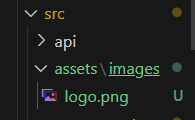
assets폴더를 만들어 image폴더를 넣고 logo가 들어있는 이미지 파일을 넣는다.
import logo from "../../assets/images/logo.png"


function Header() {
  return (
    <HeaderStyle>
      <h1 className="logo">
        <img src={logo} alt="book store"/>
      </h1>
      <nav className="category"></nav>
    </HeaderStyle>
  );
}
(2) 카테고리
// Header.tsx
import styled from "styled-components";
import ThemeSwicher from "../header/ThemeSwicher";
import logo from "../../assets/images/logo.png";

const CATEGORY = [
  {
    id: null,
    name: "전체"
  },
  {
    id: 0,
    name: "동화"
  },
  {
    id: 1,
    name: "소설"
  },
  {
    id: 2,
    name: "사회"
  },
];

function Header() {
  return (
    <HeaderStyle>
      <h1 className="logo">
        <img src={logo} alt="book store" />
      </h1>
      <nav className="category">
        <ul>
          {
            CATEGORY.map((item) => (
              <li key={item.id}>
                <a href={item.id===null?'/books' : `/books?category_id=${item.id}`}>
                {item.name}</a>
              </li>
            ))
          }
        </ul>
      </nav>
      <nav className="auth">
        <ul>
          <li>
            <a href="/login">
            로그인
            </a>
          </li> {/* ⛏️ 닫는 태그 위치 잘못되어 수정 */}
          <li>
            <a href="/login">
            회원가입
            </a>
          </li>
        </ul>
      </nav>
    </HeaderStyle>
  );
}

const HeaderStyle = styled.header`
  width: 100%;
  margin: 0 auto;
  max-width: ${({ theme }) => theme.layout.width.large};

  display: flex;
  justify-content: space-between;
  align-items: center;
  padding:20px 0;
  border-bottom: 1px solid ${({theme}) => theme.color.background};

  .logo {
    img {
      width: 200px;
    }
  }
  .category {
    ul {
      display: flex;
      gap: 32px;
      li {
        a {
          font-size: 1.5rem;
          font-weight: 600;
          text-decoration: none;
          color: ${({theme}) => theme.color.text};

          &:hover {
            color: ${({theme}) => theme.color.primary};
          }
        }
      }
    }
  }
  .auth {
    ul {
      display: flex;
      gap: 32px;
      li {
        a {
          font-size: 1.5rem;
          font-weight: 600;
          text-decoration: none;
        }
      }
    }
  }
`;

export default Header;
리액트 아이콘
https://react-icons.github.io/react-icons/
React Icons
react-icons.github.io
설치
npm install react-icons --save
Pooter
import  styled  from "styled-components";
import logo from '../../assets/images/logo.png';

function Footer() {
    return (
        <FooterStyle>
            <h1 className="logo">
                <img src={logo} alt="book store" />
            </h1>
            <div className="copyright">
                <p>
                    copyright(c), 2025, Book Store.
                </p>
            </div>
        </FooterStyle>
    )
}

const FooterStyle = styled.footer`
  width: 100%;
  margin: 0 auto;
  max-width: ${({ theme }) => theme.layout.width.large};
  border-top: 1px solid ${({theme}) => theme.color.background};
  padding :20px 0;
  display: flex;
  justify-content: space-between;

.logo {
  img {
    width: 140px;
  }
}

.copyright {
  p {
    font-size: 0.75rem;
    color: ${({ theme }) => theme.color.text};
  }
}
`;


export default Footer;