
티스토리 뷰
◆ [프론트엔드 심화]프로젝트 - 동적 UI개발(2)-레이아웃 구성, 테마스위처, Property 'color' does not exist on type 'DefaultTheme'.오류
파이썬 초보 파이리 2025. 4. 17. 17:04레이아웃 구성
Pico CSS • Minimal CSS Framework for semantic HTML
Minimal CSS Framework for Semantic HTML A minimalist and lightweight starter kit that prioritizes semantic syntax, making every HTML element responsive and elegant by default. Write HTML, Add Pico CSS, and Voilà!
picocss.com
>>인덱스에 css를 넣는 방법
//App.tsx방법1

import Layout from "./components/layout/Layout";
import Detail from "./pages/Detail";
import Home from "./pages/Home";

function App() {
  //return <Home/>;
  //return <Detail/>;
  return<Layout children={<Home/>}/>;
}

export default App;
//App.tsx방법2
import Layout from "./components/layout/Layout";
import Detail from "./pages/Detail";
import Home from "./pages/Home";
function App() {
//return <Home/>;
//return <Detail/>;
return(<Layout>
<Home/>
</Layout>);
}
export default App;글로벌스타일
1. global = 프로젝트 전체에 적용 = 프로젝트에 일관된 스타일링을 적용
2. "user agent stylesheet"로 표시되는 브라우저의 기본 스타일이 차이를 만든다.
3. 브라우저 간의 스타일 차이를 극복하기 위해 사용
우리가 웹사이트를 만들 때 사용하는 h1, p, button, input 같은 기본 태그는 브라우저마다 기본 스타일이 다르게 적용된다.
예를 들어 같은 h1이라도 크기나 여백이 브라우저마다 다르다.
이러한 브라우저의 기본 스타일은 디자인을 할 때 방해가 될 수 있다.
그래서 모든 브라우저에서 스타일을 통일되게 적용하도록 글로벌 스타일을 사용한다.
글로벌 스타일은 다음과 같은 종류가 있다:
- reset.css: 모든 기본 스타일을 초기화함.
- normalize.css: 브라우저마다 다른 부분만 정리하여 스타일을 정상화함.
- sanitize.css: 최신 웹 표준에 맞게 스타일을 안전하게 정리함. normalize.css의 개선된 스타일
https://www.npmjs.com/package/sanitize.css
sanitize.css
A best-practices CSS foundation. Latest version: 13.0.0, last published: 4 years ago. Start using sanitize.css in your project by running `npm i sanitize.css`. There are 577 other projects in the npm registry using sanitize.css.
www.npmjs.com
https://www.npmjs.com/package/styled-components
styled-components
CSS for the <Component> Age. Style components your way with speed, strong typing, and flexibility.. Latest version: 6.1.17, last published: 18 days ago. Start using styled-components in your project by running `npm i styled-components`. There are 25894 oth
www.npmjs.com
css-in-js는 왜 필요할까
1. 전역 충돌
2. 의존성 관리 어려움
3. 불필요한 코드, 오버라이딩
4. 압축
5. 상태 공유 어려움
6. 순서와 명시도
7. 캡슐화
테마
1. UI, UX의 일관성 유지
2. 유지보수가 용이
3. 확장성
4. 재사용성
5. 사용자 정의
Property 'color' does not exist on type 'DefaultTheme'.,
Property 'themeName' does not exist on type 'ExecutionContext & object'. 오류

Header.tsx파일에서 color에 빨간 밑줄이 그어졌다. DefaultTheme에 color속성이 존재하지 않는다는 것인데..
참고 : https://github.com/styled-components/styled-components/issues/3569
Styled-Components-Typescript: Property 'backgroundColor' does not exist on type 'DefaultTheme' · Issue #3569 · styled-componen
I am using react-native-Typescript for my app. My styled-components version is "styled-components": "^5.3.0". I have create custom ThemeProvider and wrap to my root app. I have have toggle dark the...
github.com
style폴더에 style.d.ts파일을 만들어서

import 'styled-components';
import { Theme } from './theme';

declare module 'styled-components' {
  export interface DefaultTheme extends Theme {}
}React-icon오류
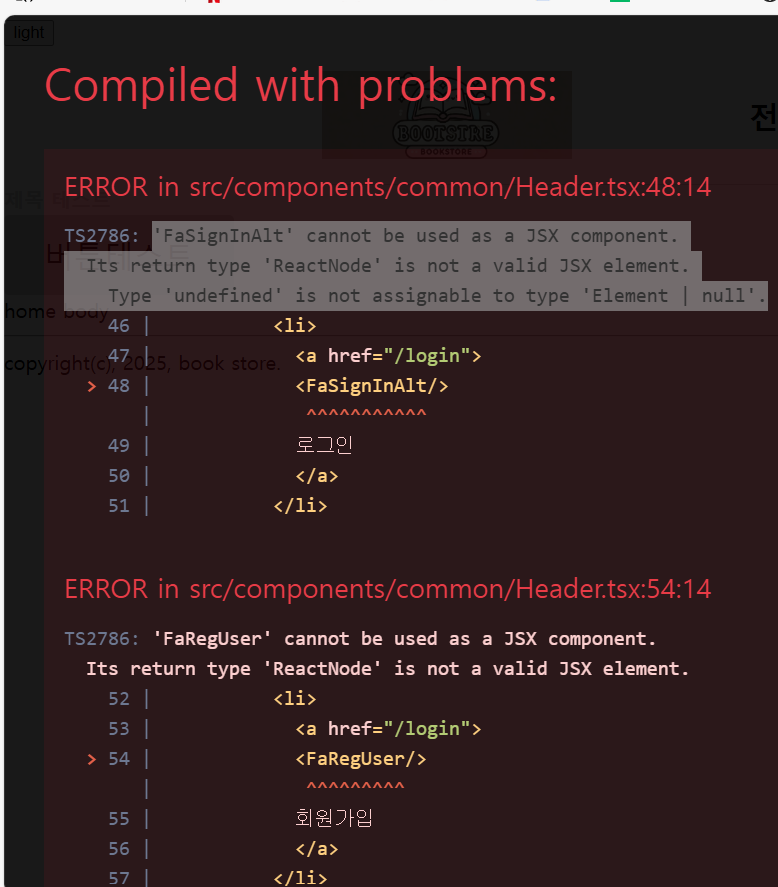
node_modules를 지우고, package.json에 내용을 “react”: “^18.2.0",로 바꾸고 다시 npm install
변경 후 react-icon을 구버전으로 변경함 -> 성공
테마스위처 contextAPI
1. 사용자는 토글 UI를 통해 웹사이트의 색상 테마를 바꿀 수 있다.
2. 색상 테마는 전역상태로 존재한다.
3. 사용자가 선택한 테마는 로컬스토리지에 저장한다.
//theme.tx

// "light" 또는 "dark" 값을 가지는 ThemeName 타입을 정의합니다.
export type ThemeName = "light" | "dark";

// 색깔의 종류를 나타내는 키입니다. ("primary", "background", "secondary", "third")
type ColorKey = "primary" | "background" | "secondary" | "third";

// Theme 인터페이스는 테마를 정의합니다.
// name: 테마의 이름 (light 또는 dark)
// color: 색상 값들을 담고 있는 객체
interface Theme {
  name: ThemeName;  // 테마 이름 (light 또는 dark)
  color: Record<ColorKey, string>;  // 색상들을 담은 객체 (primary, background, secondary, third 색상)
}

// light 테마 설정
export const light: Theme = {
  name: "light",  // 테마 이름은 "light"
  color: {  // 색상 설정
    primary: "brown",  // primary 색상은 "brown"
    background: "lightgray",  // 배경색은 "lightgray"
    secondary: "blue",  // secondary 색상은 "blue"
    third: "green",  // third 색상은 "green"
  },
};

// dark 테마 설정
export const dark: Theme = {
  name: "dark",  // 테마 이름은 "dark"
  color: {  // 색상 설정
    primary: "coral",  // primary 색상은 "coral"
    background: "midnightblue",  // 배경색은 "midnightblue"
    secondary: "darkblue",  // secondary 색상은 "darkblue"
    third: "darkgreen",  // third 색상은 "darkgreen"
  },
};

// 테마 이름에 맞는 테마를 반환하는 함수
export const getTheme = (themeName: ThemeName): Theme => {
  switch (themeName) {
    case "light":
      return light;  // "light" 테마를 반환
    case "dark":
      return dark;
//themeContexet.tsx

import React, { createContext, ReactNode, useEffect, useState } from "react";
import { getTheme, ThemeName } from "../style/theme";
import { ThemeProvider } from "styled-components";
import { GlobalStyle } from "../style/global";

const DEFAULT_THEME_NAME = "light";
const THEME_LOCALSTORAGE_KEY = "book-store-theme";


interface State {
    themeName : ThemeName;
    toggleTheme : () => void;
}

export const state = {
    themeName : "light"as ThemeName,
    toggleTheme : () => {},
};

export const ThemeContext = createContext<State>(state);

export const BookStoreThemeProvider = ({children} : {
    children : ReactNode
}) => {
    const [themeName, setThemeName] = useState<ThemeName>(DEFAULT_THEME_NAME);

    const toggleTheme = () => {
        setThemeName(themeName === "light" ? "dark" : "light");
        localStorage.setItem(THEME_LOCALSTORAGE_KEY,
             themeName === "light" ? "dark" : "light");
    };


useEffect(() => {
    const savedThemeName = localStorage.getItem
    (THEME_LOCALSTORAGE_KEY) as ThemeName;

    setThemeName(savedThemeName || DEFAULT_THEME_NAME);
},[]);


    return(
        <ThemeContext.Provider value={{themeName, toggleTheme}}>
            <ThemeProvider theme={getTheme(themeName)}>
                <GlobalStyle themeName={themeName}/>
                {children}
            </ThemeProvider>
        </ThemeContext.Provider>
    );
};
//App.tsx

import Layout from "./components/layout/Layout";
import Home from "./pages/Home";
import { ThemeProvider } from "styled-components";
import { GlobalStyle } from "./style/global";
import { ThemeName, getTheme } from "./style/theme";
import ThemeSwitcher from "./components/header/ThemeSwicher";
import { useContext,  useState } from "react";
import { BookStoreThemeProvider, ThemeContext } from "./context/themeContext";

function App() {

  return (
    <>
      <BookStoreThemeProvider>
        {/* ThemeSwitcher에 themeName과 setThemeName을 전달합니다. */}
        <ThemeSwitcher />
          <Layout>
            <Home />
          </Layout>
      </BookStoreThemeProvider>
    </>
  );
}

export default App;